
You cannot use ternary operators in this course. Doing so will result in receiving no credit for the project.
Project 05: Beaver Search
Goals and Outcomes
By the end of this project, you will…
- have worked with the Graph data structure, using a Graph to represent a database
- have implemented Google’s PageRank algorithm
- have a working search application
Connection to lecture
You will likely find the concepts from the graphs lectures to be very useful in this project.
Overview
The JSON output of WebCrawler can be seen as a database of webpages, with their contents and links to neighboring pages.
First, you will convert this database into a graph and implement Google’s PageRank algorithm to sort the pages.
Then, you will implement a method that will take this same database and convert each web page’s content into what is known as a word bag, which is just a data structure that contains all the words in the web page.
After this, you will connect the two pieces together to create a functioning search algorithm.
Finally, you will implement a pseudo-spell-checker that will use recursion to split strings if they lack spaces.
Since we are working with JSONObjects, you should copy forward all your JSON-related code from last week’s project. Also make sure to copy over JSONHelpers.java from project04.
(If you happen to see a lot of red underlines, make sure the top of the file says package edu.caltech.cs2.project05;.)
(Furthermore, you may copy your HTMLManager and HTMLParser code, as well as your WebCrawler code, if you have completed them, but they are not required at all for this project.)
The Database as a Graph
The Graph data structure will come into use in this project. You have probably heard the internet referred to as a web, or a network before–these are all just other words for graphs! Let’s take a more concrete example: suppose that on webpage A, there are two links to webpage B and one link to webpage C. This means that a user can go from A to B or from A to C. Thus, if the whole internet was just these three webpages, we could represent the internet as a graph, where webpages A, B, C are webpages, and there is an edge of weight 2 from A to B and an edge of weight 1 from A to C. The weight of an edge (A, B) on our graph will the number of times link B appears in link A’s webpage.
Task 0a.
We have already implemented the Graph itself for you; read through Graph.java.
Additionally, read through what there is so far in SearchEngine.java. Note which fields are in the SearchEngine, and note that a SearchEngine is instantiated with a JSONObject database.
In this project, we will represent our database, consisting of the data from our “whole internet,” as a Graph. Given the JSONObject database, the graphFromJSON function returns a Graph as described above.
Task 0b.
Implement graphFromJSON. In the constructor, set the field wikiGraph as the result of calling graphFromJSON.
Hint: the function getNeighborsOfPage may be helpful.
Note: even if a webpage has no outgoing links, it should still be a vertex in the graph!
After completing this task, you can run the C tests to check that the graphFromJSON tests pass.
For the rest of the project we won’t actually be using the weights of the edges, but it’s still useful to store the information, especially for other programs that may want to utilize these weights.
What is PageRank?
PageRank is the main algorithm that Google uses to rank websites in the output from their search engine. The idea behind it is that pages that have lots of other pages linking to them are likely more popular or important, and thus should show up more frequently in search results. Therefore a page with more links to it should have a higher “rank”. The algorithm also weights the significance of some page A linking to another page B by page A’s rank, since logically, a link from a more important website should be considered more important. This gets around issues such as having several otherwise empty websites link to a page to increase its importance.
PageRank Specification and Example
The easiest way to visualize PageRank is as a large directed graph.
Imagine we have four websites, A, B, C, and D, where A links to B, B links to A and C, C links to A and D, and D links to A. We could think of this as a graph where each website is a vertex and each link is a directed edge. Now, we can’t weigh each edge’s importance without knowing each site’s importance first, but we also can’t weigh each site’s importance without knowing each other site’s importance first. To get around this we should iteratively adjust each site’s importance in what we will refer to as rounds. We start with each page having an equal weight of 1 over the total number of vertices, so in our example each starts with a weight of 1/4. Then, in each round, each vertex should distribute its weight equally across all of its outgoing edges.
So, in our example, A, B, C, and D all start with a value of 0.25. Then, in the first round, A sends 0.25 to B, B sends 0.125 to A and 0.125 to C, C sends 0.125 to A and 0.125 to D, and D sends 0.25 to A, leaving A with 0.5, B with 0.25, and C and D both with 0.125. In the second round, A sends 0.5 to B, B sends 0.125 to A and 0.125 to C, C sends 0.0625 to A and 0.0625 to D, and D sends 0.125 to A, leaving A with 0.3125, B with 0.5, C with 0.125, and D with 0.0625.
Below are a couple pictures showing this process (from left to right: the initial state, after the first round, and after the second round).
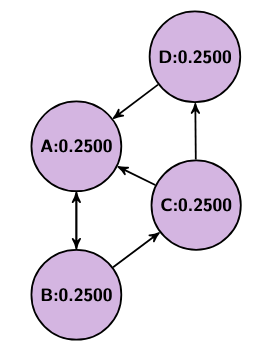
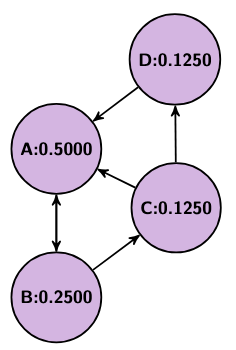
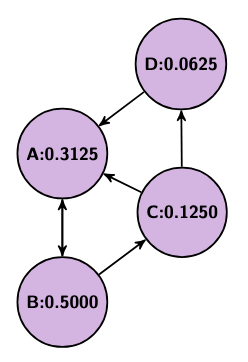
As this process repeats, each page’s rank will approach what is known as a “steady state,” where the values will stop changing.
However, let us consider an example: let us say we have a graph of two nodes, E and F, and E points to F. You might notice that in such an example, after just 1 round E is left with 0 weight and F is left with 1 weight. This behavior can be problematic in other graphs too, if there exist vertices with no inputs or no outputs. So, to avoid this, we introduce two fixes. First, we add a damping factor. This damping factor will be what percent of a page’s weight is allowed to shift at each round. So, for a value of 0.85, only 85% of each page’s weight will redistribute each round. The remaining 15% will be equally distributed among all pages (but, since this happens for every single rank, we can just think about giving 0.15/n rank to every page, where n is the number of pages). Second, if a page is what’s known as a sink, meaning it has no out-going edges, then we distribute its old rank evenly among every page (including itself), so that whatever rank it stores doesn’t disappear.
PageRank Implementation
In this part, you will create Google’s PageRank method, using the previous project’s WebCrawler output as the description of our world wide web.
By using your JSON Parser to read in last week’s output, we can now create an adjacency list that represents the internet as a graph!
This is also why you implemented WebCrawler last week, so we could index webpages to create a graph from them to run PageRank on.
public HashMap<String, Double> pageRank()
Utilized the wikiGraph field to run Google’s PageRank algorithm, as described above.
Hint: remember that this algorithm should run in rounds, for MAX_ITERATIONS rounds.
Task 1.
Implement the PageRank algorithm in the method pageRank. Note that you should be using functions from the Graph class and the wikiGraph field.
Note: the result of this method should be stored in the respective field in the constructor!
Congratulations! You now have a working PageRank algorithm: given a database representing (some portion of) the internet, you have created a Graph representing the relations between webpages, as well as implemented an algorithm for sorting those pages.
Word Bag and Relevant Links
public HashMap<String, HashMap<String, Integer>> getWordBagDict()
Given an output database from WebCrawler, returns a HashMap where each key is a website link, and each value is a HashMap mapping all the words on that website’s page to the number of times they occur on the page.
All words should be converted to lowercase.
Additionally, words split by punctuation, such as “close-up” or “debuggi.ng” , should be split into their respective parts.
Hint: remember that you should consider punctuation when splitting the document into its individual words. We have provided you with a regex SPACE_AND_PUNCTUATION_PATTERN that should be useful. This regex string matches consecutive spaces and/or punctuation marks.
Also note Java’s .split() method takes in regex.
Hint: the function getPageTextOfPage(String page) should be useful!
Since we are feeding you the input as a JSONObject, formatted as an output from WebCrawler, you should copy forwards your code from last week’s project so you can easily parse the input.
Task 2a.
Implement getWordBagDict and set the field wordBagDict to the result of calling this method in the constructor.
Suppose that you type the word “dog” into a search engine: if each page has a word bag, how would the search engine decide which links are relevant? If a webpage does not mention the word “dog,” then that page should not be relevant, and if it does contain the word “dog,” then it should be relevant. We want to check every page’s word bag to see if it contains all the words in our query. Below, you will use the wordBagDict you have just created to, given a query typed into our search engine, return a set of relevant links in our database.
public HashMap<String, Integer> getRelevantLinks(String query)
Given a String query, return a HashMap whose keys are all the links whose webpages contain all the words in query and whose values are the minimum number of times any one word from the query appears in the webpage.
Task 2b.
Using wordBagDict, implement getRelevantLinks.
Hint: spliting by spaces should be useful (e.g., in the query “chicken noodle”, we should look for all links whose webpages have both “chicken” and “noodle”).
Note: In the constructor, the wordBagDict field should store the value returned by this method.
Levenshtein Distance
If you actually run the above search engine, you might notice that some of your searches are pretty far off. While PageRank is great at ranking pages by importance, it’s not great at handling specifics, such as distinguishing between the top 10 or 15, in the case of our wikipedia database. So, to resolve this, you will design a helper method that, when given the top k search results, will order them more accurately using Levenshtein Distance.
Given a string, a, of n characters a_0a_1a_2a_3…a_n, and a string b, of m characters b_0b_1b_2b_3…b_m, the two strings’ Levenshtein distance is the minimum number of character insertions, deletions, or swaps we would need to make to transform one into the other. This serves as a measurement of how far apart two strings are (which is why it’s called a distance). In our sorting algorithm, we’ll use Levenshtein distance to help us decide which pages are more important based on how far apart a query and its link are.
public static int getLevenshtein(String a, String b)
Given two Strings a, and b, calculates the Levenshtein distance function, lev, as described below, defining tail(x) as x excluding its first character. If one String is empty, lev(a,b) should equal the length of the other string (since it would take that many insertions to make them match). If the first character of both strings match, return lev(tail(a), tail(b)) (since we can just ignore that character). Otherwise, return 1 + min(lev(tail(a), b), lev(a, tail(b)), lev(tail(a), tail(b))) (since we could either delete one character or swap one out).
Hint: Your first instinct may be to implement this function using recursion. However, note that because the otherwise case requires three recursive calls, the recursive blow up for even a short string will be enormous. What’s another technique that we have covered in class that you could use here?
Task 3.
Implement the getLevenshtein function.
A Basic Search Engine
To create the final search engine, we need to use getWordBagDict and PageRank as preprocessing steps (since we don’t want to recalculate pageRanks or re-parse pages’s text on thousands of pages mid-search).
As for the actual search, we want to take three factors into account when weighting each page - the page’s rank, the number of times the query appears in the body, and if the query appears in the url.
You should reweight each page’s value by multiplying its rank by its result from getRelevantLinks. Additionally, multiply this by URL_FACTOR if each word of the query appears in the url.
Once every value has been calculated you should use the function getOrderedResults(String query, HashMap<String, Integer> counts, HashMap<String, Double> relevantPageRank, int maxResults). This function takes in as input the search query, the output of getRelevantLinks, a map of the weights calculated, as described in the above paragraph, and the maximum number of results that should be returned. This function finds the first maxResults entries according to the weights in relevantPageRank, and then re-sorts those top results according to another metric. If there happen to be fewer than maxResults results, then this function will simply return all the results.
public List<String> search(String query, int k)
Given a query, searches for all webpages that contain all words in that query, and returns the first k of them, ordered according to the formula defined above.
Task 4. Implement the search function.
The dataset we use for some of our larger tests and our frontend consists of tens of thousands of pages; it may take several seconds for your code to run pageRank and getWordBagDict on.
Split By Spaces
Another common feature seen on Google is some form of spell check. For the A-tests for this project, you will implement a part of spell check, which is able to separate words when conjoined. We’ve provided you with several helper methods to accomplish this task:
public static double getScore(String query)
Given a String, query, returns the average of the weights of its words, as determined by the OneGrams Map.
public String splitBySpaces(String query, int k)
Given a query with some number of missing or misplaced spaces, fixes the spacing, returning the fixing with the highest score.
Task 5.
Move to SplitBySpaces.java and implement splitBySpaces.
Hint: We discussed an algorithm in lecture to split by spaces and find all possible valid Strings.
Hint: In project01 you created a similar algorithm, working with QuadGramLikelihoods.
Note: your algorithm should only consider sentence splits that consist of solely valid words. We can determine these valid words by their presence in the field dictionary, which you can assume will be already populated when splitBySpaces is called; out of those splits, you should give the best scoring split.
In Use
Task 6.
If you’ve completed everything up to here, you can go take a look at your code in action. In the project05 folder, you will find a file called BeaverSearch.java. Running that file will open up our own “Beaver Search” webpage in your browser. There, you can type your own search query into the query box, and the “search engine” will give you your (ranked!) results!